 Live Chat











-


Welcome to playnow
The best place to play online
Depositing on PlayNow is simple.
Depositing from your phone is simple.

Step 1:
Log in to your PlayNow account by clicking the button on the top right.

Step 1:
Log in to your PlayNow account by clicking the button on the top right.

Step 2:
Enter your email and password.

Step 2:
Enter your email and password.

Step 3:
Once logged in, click on the profile icon on the top right corner to open up your account menu.

Step 3:
Once logged in, click on the profile icon on the top right corner to open up your account menu.

Step 4:
This is where you can find all your account information. Click DEPOSIT to add your money to your PlayNow account.

Step 4:
This is where you can find all your account information. Click DEPOSIT to add your money to your PlayNow account.
Step 5:
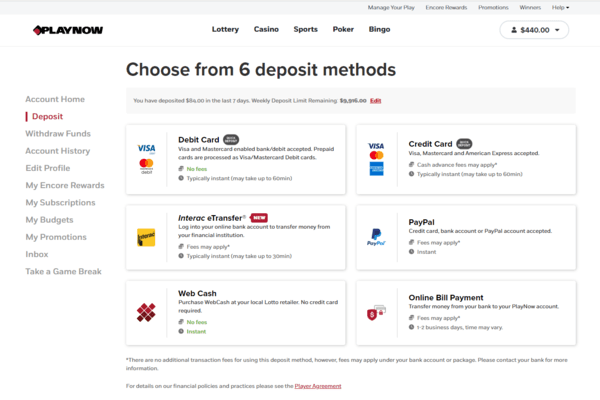
Choose your preferred deposit method. While most methods are free of charge, some do come with a small fee.
See all deposit methods

Step 5:
Choose your preferred deposit method. While most methods are free of charge, some do come with a small fee.